In Depth: Version Numbers Are Vanity Labels
[In Depth #40] We trust version numbers to mean a specific, fixed release - but they're really just labels pointing at a commit, and an attacker can quietly move them. Let's dig into tag hijacking, the attack behind tj-actions and Laravel-Lang. 😈

Following on from last week's Security Tip about using Laravel Moat to protect our repositories, I want to dive into the mechanics of how supply chain attacks work - specifically tag hijacking. There is a surprising amount to cover, and it reveals just how fragile the user-friendly scaffolding we've built really is, and thus why we're seeing so many successful attacks at the moment.
Something I say a lot when talking about password security is that humans are forgetful and lazy, so we'll reach for simple passwords that are easy to remember. Funnily enough, this logic applies to dependencies too - we use friendly version numbers everywhere (v1.2.3), instead of commit SHA hashes (06e1e8ef749ba9f9daa8cf561c2f94ab696e1b3d), because version numbers are so much easier to use.
But here's the catch: version numbers aren't immutable!
Version numbers are a tag that has been applied to a specific commit, however this tag is simply a vanity label. It can be removed from one commit and assigned to another. Which means an attacker who can manipulate tags on a repository can swap out the legitimate version for a malicious one - and any tool pulling in that tag won't notice the difference (under the right conditions).
This loophole makes hijacking packages and injecting malicious versions powerful, although let's not forget that incrementing a version number for malicious versions is still highly effective - all you need is access to the repository. We're not just dealing with local package managers either, but also tools like CI (Continuous Integration) systems, such as GitHub Actions, which also rely on version numbers through tags.
Ultimately, any system that relies on v2 as the indicator for a safe version is at risk if v2 can be redirected or v2.1 can be added.
Let's dig into it!
What Happened With tj-actions/changed-files and Laravel-Lang?
Before we look at the mechanics and how all the pieces fit together, let's take a look at two recent examples of this attack in action.
tj-actions/changed-files
The tj-actions/changed-files GitHub Action was compromised through a stolen Personal Access Token (PAT) for a maintenance bot, which had access to manage the repository. Because GitHub forks share the same internal git object storage, a commit pushed to a fork can be loaded by hash from the parent repository, which allowed the attacker to push a malicious commit to a fork and update the tags on the repository to point to this malicious commit.
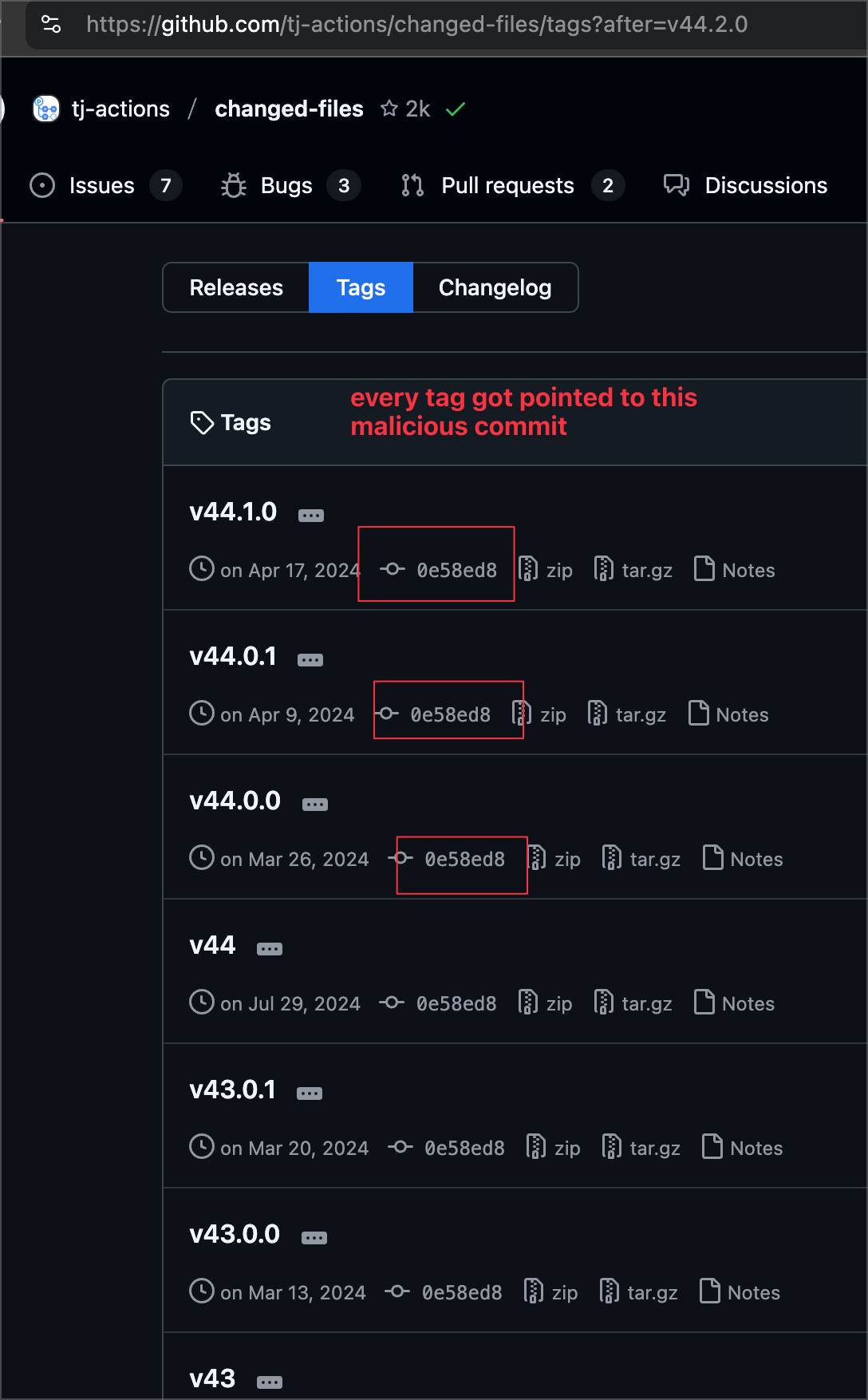
With all tags pointing to the malicious commit, every CI workflow that referenced an updated tag loaded the malicious code. This code caused CI secrets/keys to be dumped into the build logs - which are public - allowing the attacker (and anyone else) to harvest these secrets and keys.
This was all made possible because CI workflows were referring to the Action based on the version, and the system had no way to verify if it was getting the actual version:
- name: Get changed files
  id: changed-files
  uses: tj-actions/changed-files@v44
The tj-actions/changed-files action was used by over 23,000 repositories at the time, and the attack was assigned CVE-2025-30066.
Laravel-Lang
Similar to the previous attack, a Personal Access Token belonging to one of the Laravel-Lang/* team members was obtained by the attacker from a recent GitHub data leak, who then used it to update release tags on the targeted packages, pointing them towards malicious commits they had pushed into the repositories.
Once the tags were in place, any new composer install or composer update pulled in the malicious commits, introducing malware into the victim's environment. This malware was hidden inside src/helpers.php, and autoloaded through composer.json:autoload.files - which loads the malicious code every time Composer's autoloader is initiated.
Scarily, as the package maintainers tried to stop the attack and clean up tags, the attackers continued to recreate them - in the maintainer's own words, they were being restored "right before our eyes." See their full account for the details.
It's worth pointing out that this attack would not have worked when an existing composer.lock was present alongside composer install, as that uses the package commit hash to lock down versions. However, running composer install without composer.lock or composer update would have pulled in the malicious version.
As reported by Snyk, 700 versions were compromised across four packages (laravel-lang/lang, laravel-lang/http-statuses, laravel-lang/attributes, and laravel-lang/actions), and an earlier report by Aikido caught ~233 before the attack continued.
How Git Tags Actually Work
So how does a friendly little v2.1 end up handing over your AWS keys, and why is it just a vanity label?